

Description
Converted to FS25 from the original FS22 mod by Poohbear Lance, kept as close to the FS22 version as possible.
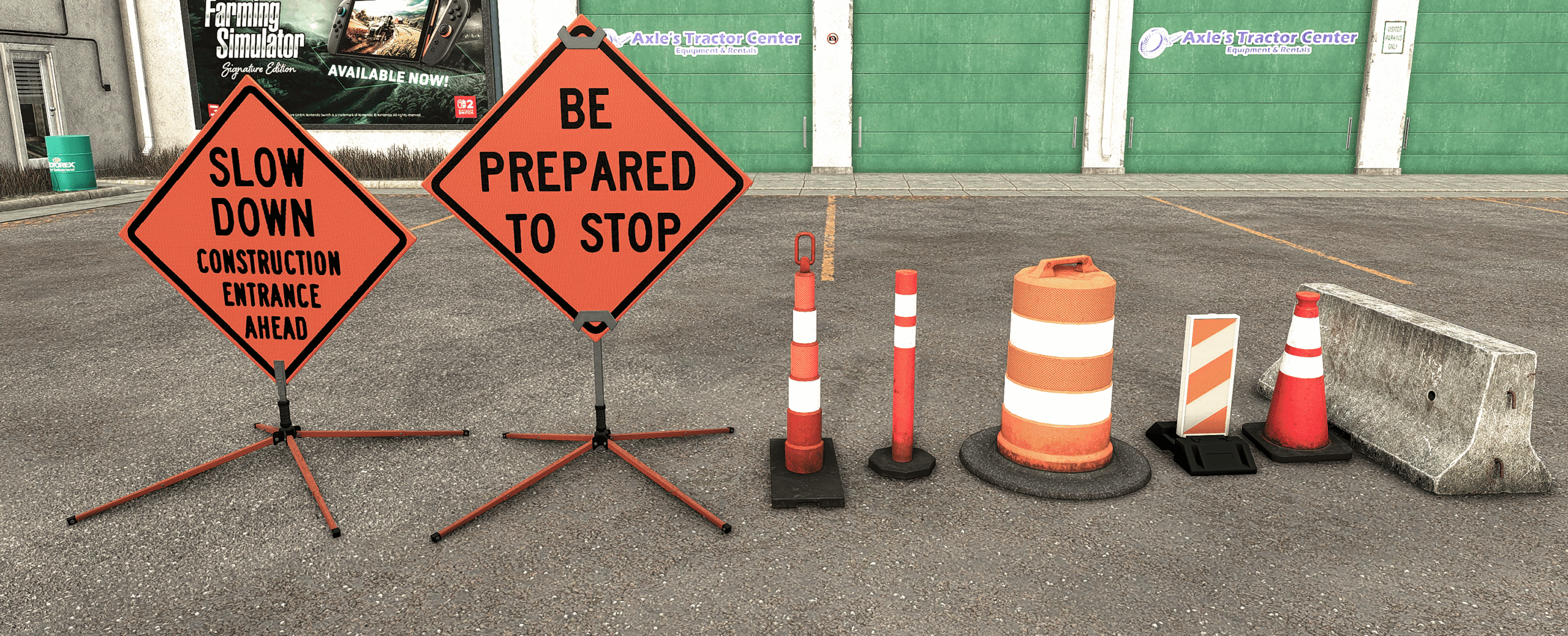
This mod adds portable construction signs and traffic control devices to Farming Simulator 25. You can use them to warn drivers before your road work, set up detours, mark lane closures, or build a realistic work zone alongside the WANCO Automated Flagger and Arrow Board.
This mod adds portable construction signs and traffic control devices to Farming Simulator 25. You can use them to warn drivers before your road work, set up detours, mark lane closures, or build a realistic work zone alongside the WANCO Automated Flagger and Arrow Board.
Features
Construction Signs- Roll Up Sign and Hard Sign versions
- 31 sign faces, including Road Work Ahead, Flagger Ahead, Detour, Merge, Lane Ends, Speed 45 and many more
- 4 DOT-style reflective colors: Orange HiVis, Pink (Emergency) HiVis, Yellow LowVis, White HiVis
- Stand with orange-red legs, black caps, galvanized metal and warning flags
- Adjustable legs with click controls
- Barrel
- Carpenter’s Cone
- Delineator (two styles)
- Burnell Divider
- Barricade
FS25 conversion
- Rebuilt for FS25 to match the FS22 original as closely as possible
- All sign faces, colors, options and prices kept the same as FS22
- Materials updated to FS25 using GIANTS’ own conversion rules
- Original FS22 textures kept on the traffic control devices
Requirements
- Interactive Control (FS25) is required for the leg and sign click controls, the same as in FS22.
Details
- Game version: Farming Simulator 25
- Platform: PC/Mac
- In-game shop prices:
- Hard Sign: $711
- Roll Up Sign: $586
- Barricade: $200
- Burnell Divider: $190
- Barrel: $165
- Delineator 2: $165
- Delineator: $155
- Carpenter’s Cone: $135
- Multiplayer: Untested
Installation
- Download
FS25_Portable_Construction_Signs.zip. - Do not unzip it. Put the zip in your mods folder:
- Windows:
Documents\My Games\FarmingSimulator2025\mods - Mac:
~/Library/Application Support/FarmingSimulator2025/mods
- Windows:
- Turn the mod on in your savegame’s mod selection.
- Buy the signs and devices in the shop
- Download
FS25_interactiveControl.zip. - Do not unzip it. Put the zip in your mods folder:
- Windows:
Documents\My Games\FarmingSimulator2025\mods - Mac:
~/Library/Application Support/FarmingSimulator2025/mods
- Windows:
- Turn the mod on in your savegame’s mod selection.
Credits
Original FS22 mod: Poohbear Lance FS25 conversion: bubbashep2005 Game: Farming Simulator 25 by GIANTS Software
Files
5.2 MB
Primary2 Downloads
Required Mods

Comments
Login to leave a commentDownload
Version:1.0.0.1
File size:5.2 MB
Downloads:2
Rating
Rating
0Rate this mod
Views
12