
Description
Unofficial Courseplay FS25 Custom Build Changelog
Original base: Courseplay 8.1.0.3 / 8.1.x series - All credits go to Courseplay devs
Current custom build: 8.3.0.1
=========================================================
VERSION / CORE CLEANUP
=========================================================
- Fixed a fieldwork turn-state logic issue that could affect turn handling.
- Bumped custom version through the project, ending at 8.3.0.1.
- Cleaned up older/incorrect references from the base mod.
- Removed/avoided duplicate Lua registration issues.
- Fixed vehicle configuration XML issues, including bad offset naming and duplicate entries.
- Updated visible FS22-style text/references where they were showing incorrectly in the FS25 build.
========================================================
MAJOR HUD OVERHAUL
========================================================
- Reworked the Courseplay mini HUD into a cleaner style layout.
- Kept the Courseplay green/black color theme.
- Added a cleaner title bar:
- Courseplay - Fieldwork
- Courseplay - Unload Combine
- Courseplay - Silo Work
- Moved version number to the top-right of the HUD.
- Removed visible CP: prefixes from HUD text where possible.
- Enlarged and cleaned the vehicle name row.
- Added/realigned the eye/course visibility icon.
- Cleaned divider lines and spacing.
- Improved font sizes and alignment.
- Fixed long vehicle names so they trim cleaner instead of overflowing.
- Rebuilt the bottom action row so buttons stay in a consistent order:
1. Courseplay/settings, Field target / crosshair
2. Play, Record or next/unload-now, Pause / reverse / recycle, Clear
3. Clear copied course cache, Copy generated course
- Made buttons larger and easier to click.
- Fixed overlapping/non-clickable button issues.
- Moved all main action buttons to the bottom.
- Kept copy-generated-course button available.
- Added/cleaned the copied-course cache clear button.
- Changed the unload-combine “next” icon scaled/positioned cleaner.
- Prevented hidden buttons from remaining clickable underneath visible buttons.
- Fixed HUD movement so it cannot be dragged while locked.
- Fixed a bug where dragging the HUD moved the background but left buttons/text behind horizontally.
- HUD position now moves as one unit.
- HUD position/state is saved better.
- Added HUD open/closed persistence.
- If the HUD was open when saving, it should reopen after loading.
- If it was closed when saving, it should stay closed.
- Saved HUD position is retained.
========================================================
FIELDWORK HUD TEXT CLEANUP
========================================================
- Cleaned fieldwork HUD labels and values:
- Waypoint: 1530/3050
- Start at: last waypoint
- Start at: nearest waypoint
- Start at: first waypoint
- Work width
- Tool offset horizontal
- Added the missing space after Waypoint:.
- Fixed course display states:
- Course: temporary
- Course: (none)
- Course: Field 8 - Spreader
Current intended behavior:
- If a course has a field, show:
- Course: Field 8 - Spreader
- If multiple fields are detected, show:
- Course: Fields 8, 9 - Spreader
- If no field is detected, fall back to the course/tool name:
- Course: Spreader
- If no course is loaded:
- Course: (none)
- If a temporary/generated course exists but is not saved:
- Course: temporary
- Added redundancy protection so it should not show:
- Course: Field 8 - Field 8 - Spreader
========================================================
SAVED-COURSE FOLDER / PATH DISPLAY
========================================================
- Added folder/path-aware course display.
- Tried mapping folders like:
- combine/field 8
- sprayer/field 8
- planter/field 8
- Later changed the preferred display to field-first format:
- Course: Field 8 - Spreader
instead of:
- Course: Spread - Spreader
========================================================
AUTO-GENERATED COURSE NAMES
========================================================
- Added generated-course auto-name logic and bumped to 8.2.1.0 for that feature.
New auto-name style examples:
- Field 8 - Spreader
- Field 8 - Harvester
- Fields 8, 9 - Mower
Design choices:
- No crop name included.
- No fill type included.
- Keeps the course reusable across crops/products.
- Uses field number first.
- Uses implement/tool type second.
- Falls back to generic course/tool name if no field is detected.
========================================================
COURSE GENERATOR / JOB MENU CHANGES
========================================================
- Made Create Job bottom actions visible immediately on the map page.
- Start Job / Generate Course should appear without needing to switch tabs first.
- Cleaned labels in the job menu.
- Removed visible CP: prefixes from some action text.
- Improved bottom-action syncing across pages.
========================================================
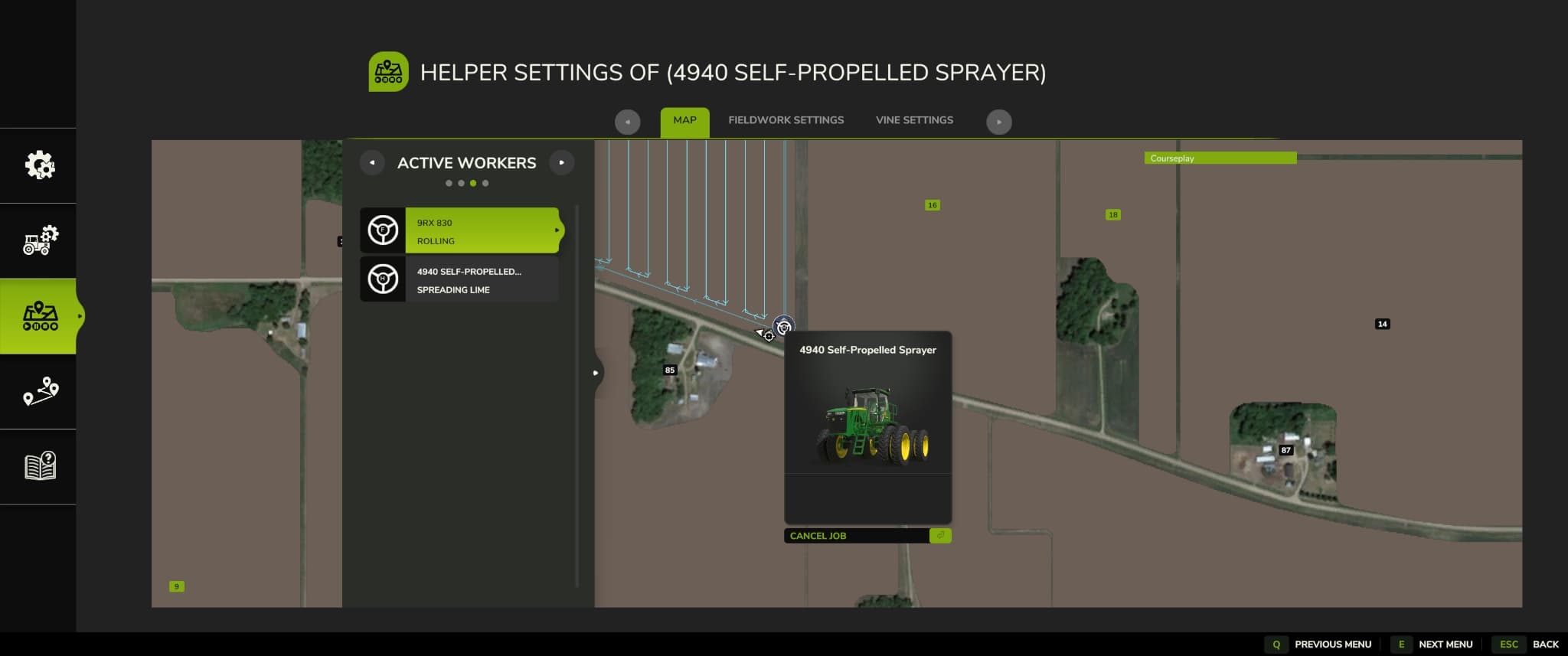
ACTIVE WORKERS MENU INSIDE COURSEPLAY
========================================================
- Fixed selected worker index mismatch.
- Fixed vehicle name mismatch.
- Added better active worker descriptions.
- Improved selected-row behavior.
- Long worker names/descriptions trim cleaner.
- Added detailed worker task text such as:
- Planting
- Seeding
- Spraying
- Spreading
- Harvesting
- Mowing
- Baling
- Unloading Combine
- Bunker Silo Work
- Loading Silo
- Collecting Bales
========================================================
BASE GAME ACTIVE WORKERS MENU INJECTION
========================================================
- Added shared worker detail text so the base game Active Workers list can show clearer CP job descriptions instead of generic text like:
- FIELD WORK - WORKING THE...
Expected examples:
- Spreading Lime
- Spraying Herbicide
- Planting
- Seeding
- Harvesting
- Unloading Combine
- Collecting Bales
========================================================
WARNING TEXT CHANGES
========================================================
Changed the center-screen unloader warning.
Old style:
- CP: Unloader too far away from the field.
New style:
- Unloader too far away! Move closer to target field or set a new target!
Also:
- Removed the CP: prefix from the center warning.
- Left this warning as a center-screen warning, not a persistent top-right game info message.
========================================================
INFO TEXT / NOTIFICATION SETTINGS
========================================================
Added and refined an info-text display setting.
Current choices:
- Deactivated
- Courseplay HUD box (constant)
- Warning popups only
- Game info area (persistent)
Meaning:
- Deactivated: no extra CP info box.
- Courseplay HUD box (constant): CP info box stays visible.
- Warning popups only: CP info box only appears temporarily for warnings.
- Game info area (persistent): uses the game’s notification/info area.
- Prevented duplicate stacked copies of the same message.
- Keeps one active message alive while the problem still exists.
- Clears it when the problem is fixed.
- Rate-limited repeated updates.
- Added context where possible:
- 9RX 770 needs to be refilled with seed
- 4940 Self-Propelled Sprayer needs to be refilled
- 9RX 830 needs to be refueled
- Limited persistent messages to actual stoppage/problem states.
- Did not make normal status messages persistent.
========================================================
NOTIFICATION SOUND SETTING
========================================================
Added setting:
- Game info notification sound
Purpose:
- Plays a sound once when a new warning starts.
- Does not spam repeatedly while the same issue remains active.
========================================================
AUTODRIVE REFILL / MODE FIXES
========================================================
Fixed the issue where AutoDrive refill/reload caused the Courseplay HUD to get stuck in the wrong mode.
Specifically:
- Fieldwork jobs should stay on the Fieldwork HUD.
- Sprayers/spreaders/planters should not remain in Silo Work after emptied/refill.
- HUD now prefers the actual running CP job instead of a stale selected HUD mode.
- After AutoDrive refill, restart should resume fieldwork instead of forcing the wrong page.
- Restart after refill was adjusted toward last waypoint behavior instead of restarting from the beginning.
========================================================
SILO WORK SEPARATION
========================================================
- Kept actual Silo Work for bunker/silo jobs.
- Fieldwork refill/reload should no longer be treated as Silo Work.
- Lime spreading, spraying, planting, etc. should remain Fieldwork.
========================================================
DEFAULT SPEED CHANGES
========================================================
Changed default speeds:
- Turn speed default: 10 km/h
- Reverse speed default: 10 km/h
- That is about: 6.2 mph
- Existing vehicles may keep saved values, but new/default settings use the new value.
========================================================
TEXT / CAPITALIZATION POLISH
========================================================
- Waypoint: kept uppercase.
- Added spacing after Waypoint:.
- Start at: kept uppercase.
- Start values kept lowercase:
- last waypoint
- nearest waypoint
- first waypoint
- Course state labels cleaned.
- HUD and menu text made more consistent overall.
I want to thank the Courseplay dev team for a wonderful mod! Please donate to them!
Credits
jb2zero0six5
Files
3.8 MB
Primary5 Downloads
Total downloads including previously deleted files: 5
