
Description
This is a revamp of the good old VehicleSort from FS17
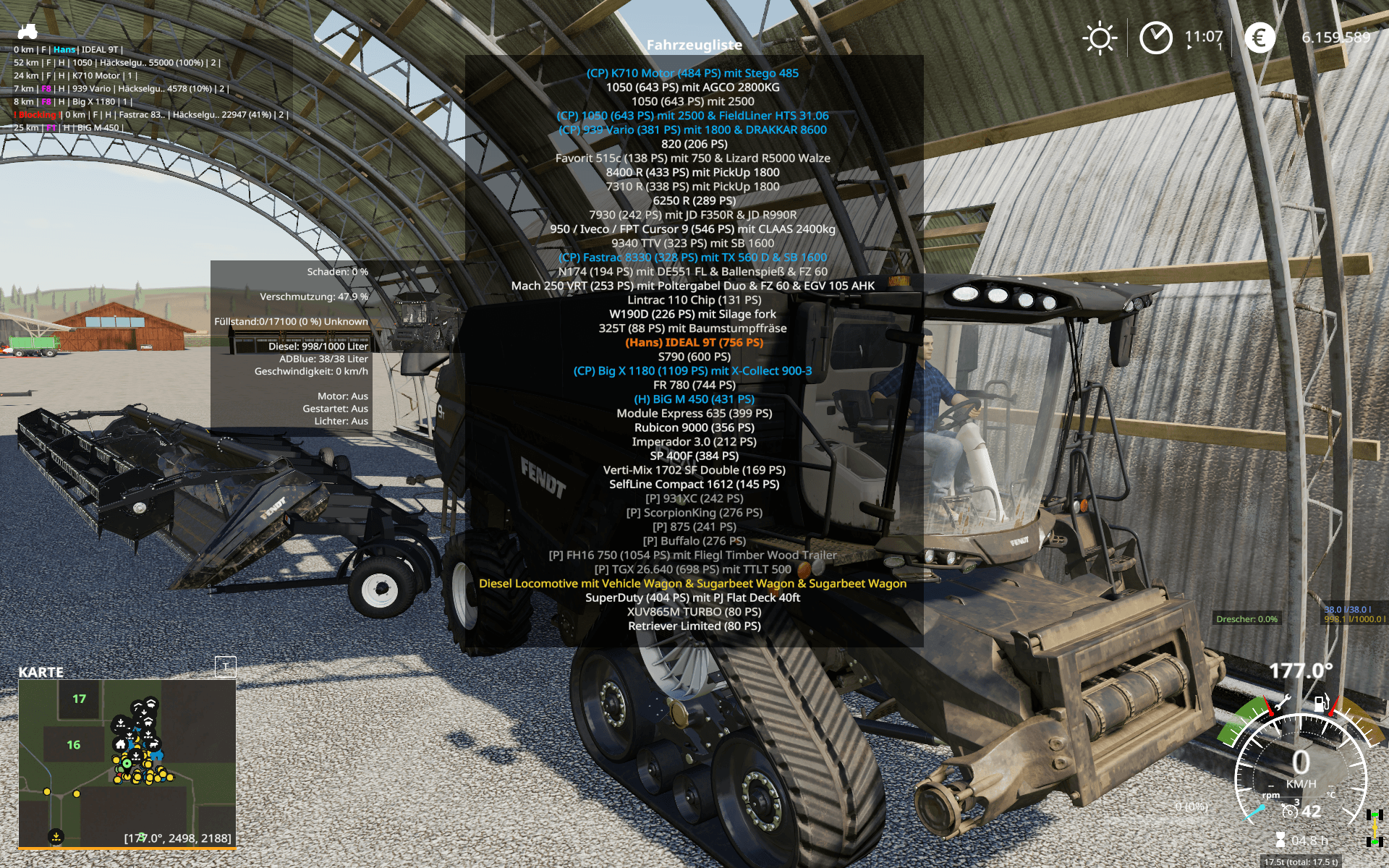
For beginners: VehicleExplorer helps you organize your vehicles, by showing you a list which can be organized, well, sorted by you. Besides that it has a couple of additional functionality. See below.
Features
List of all steerable vehicles (Specialization: Enterable)
Set a customer order for your vehicles
Your order is saved in the default vehicles.xml, so no additional clutter
Enter your vehicles directly with a click of a (mouse) button
This is meant literally, see known issues ;)
EasyTab: Switch between the last two selected vehicles
Park your vehicles, so that a switch of vehicles via Tab ignores them
Repair vehicles and its implements
Let your vehicle and implements get cleaned on a repair from your friendly VeEx staff ;)
If Seasons is enabled, you can also let the vehicle and implements get repainted
Displaying a store image next to the list
Info box with additional informations
Motor on/off, turned on/off (for e.g. harvester) and light status is saved and restored
Different colors in the list if a vehicle is selected, or currently used by a helper/Courseplay
Config Menu
Config is saved per savegame within modsSettings/VehicleExplorer/savegameX
Show/hide trains in the list
Show/hide station cranes in the list (No idea if that actually works, would need a map with a crane to test)
Show/hide steerable implements/trailers (e.g. forwarder trailer with crane)
Show/hide brand names in the list
Show/hide your own name when you enter a vehicle
Show/hide horse power in the list
Show/hide fill levels in the list
Show/hide implements in the list
Show/hide store images
Show/hide infobox
Move infobox up/down
Show/hide a background for the infobox/store image
Change text size
Change text alignment
Change list background transparency
Enable/disable saving of the additional vehicle status (motor, turnedOn, lights)
Show/hide keybindings in the game F1 help menu (needs a game restart to take affect)
Clean vehicle & implements on a repair
Tardis integration
With Tardis you can teleport yourself AND your vehicles to any position on the map
With VehicleExplorer & Tardis you can select a vehicle on the list, and teleport that to any location without entering it. You can also configure if you want to enter the vehicle after teleportation or just drop the vehicle to another location
With Tardis Map Hotspots you can again, select a vehicle and quickly teleport that to one of those hotspots
Known issues
Although you can change all the keyboard bindings, the mouse actions are hardcoded for now
Left mouse click: Enter vehicle
Right mouse click: Select vehicle (to e.g. move it)
Right mouse click: Change value in the config menu
Mouse wheel: Selection up/down in list
Max of three columns. If you've more vehicles (which would be insane anyways ;) , just disable the display of brand name etc
Incompatible Mods SpeedControl
Actually both work fine side by side. There is just a keybinding overlap. So you've to set new keybindings through the game menu for Key 1, Key 2, Key NumPad Plus, Key NumPad Minus
Changed the default keybinding. So there is no overlap anymore.
Default Keybinding
Key Combi Action
LAlt + v Show/hide vehicle list
LAlt + KeyPad Minus Show/hide config menu
KeyPad Enter Enter vehicle
LAlt + p Toggle parking
LAlt + KeyPad 5 Select item (for moving the vehicle) or to change values in the config
LAlt + KeyPad 8 Move up in the list/config
LAlt + KeyPad 2 Move down in the list/config
LAlt + 1 Move up fast in the list/config
LAlt + 2 Move down fast in the list/config
LAlt + R Repair vehicle incl. implements
Tab Next vehicle; VeEx own switch vehicle implementation (necessary to tab through vehicles in your own order)
Shift + Tab Previous vehicle; VeEx own switch vehicle implementation (necessary to tab through vehicles in your own order)
LCtrl + Tab easyTab; Easily tab between the last two vehicles you switched through VeEx
Mouse Left Enter vehicle
Mouse Right Select item/change values in config
Mouse Wheel List up/down
_ If you want to use the 'sorted tabbing', make sure you drop the default key binding in the game menu. I didn't find a way to overwrite the default vehicle switching, and I think it's better to let you, the user, this choice anyways. _
Meaning of colors used
Color Meaning
White Standard
Green Current player is controlling vehicle
Orange Vehicle selected
Red Vehicle locked (necessary to move it up/down in the list)
Grey Vehicle is parked
Blue Vehicle is controlled by AI (Helper or Courseplay)
Light Pink Vehicle is controlled by FollowMe (not yet available)
Yellow Engine is running
Note that the current version does NOT support multiplayer!
There were reports that VehicleExplorer does work in MP if you simply change the moddesc.xml. Although I assume not everything works then. Anyways, I decided to work on a MP version. Just have no idea yet till when it will be available.
For beginners: VehicleExplorer helps you organize your vehicles, by showing you a list which can be organized, well, sorted by you. Besides that it has a couple of additional functionality. See below.
Features
List of all steerable vehicles (Specialization: Enterable)
Set a customer order for your vehicles
Your order is saved in the default vehicles.xml, so no additional clutter
Enter your vehicles directly with a click of a (mouse) button
This is meant literally, see known issues ;)
EasyTab: Switch between the last two selected vehicles
Park your vehicles, so that a switch of vehicles via Tab ignores them
Repair vehicles and its implements
Let your vehicle and implements get cleaned on a repair from your friendly VeEx staff ;)
If Seasons is enabled, you can also let the vehicle and implements get repainted
Displaying a store image next to the list
Info box with additional informations
Motor on/off, turned on/off (for e.g. harvester) and light status is saved and restored
Different colors in the list if a vehicle is selected, or currently used by a helper/Courseplay
Config Menu
Config is saved per savegame within modsSettings/VehicleExplorer/savegameX
Show/hide trains in the list
Show/hide station cranes in the list (No idea if that actually works, would need a map with a crane to test)
Show/hide steerable implements/trailers (e.g. forwarder trailer with crane)
Show/hide brand names in the list
Show/hide your own name when you enter a vehicle
Show/hide horse power in the list
Show/hide fill levels in the list
Show/hide implements in the list
Show/hide store images
Show/hide infobox
Move infobox up/down
Show/hide a background for the infobox/store image
Change text size
Change text alignment
Change list background transparency
Enable/disable saving of the additional vehicle status (motor, turnedOn, lights)
Show/hide keybindings in the game F1 help menu (needs a game restart to take affect)
Clean vehicle & implements on a repair
Tardis integration
With Tardis you can teleport yourself AND your vehicles to any position on the map
With VehicleExplorer & Tardis you can select a vehicle on the list, and teleport that to any location without entering it. You can also configure if you want to enter the vehicle after teleportation or just drop the vehicle to another location
With Tardis Map Hotspots you can again, select a vehicle and quickly teleport that to one of those hotspots
Known issues
Although you can change all the keyboard bindings, the mouse actions are hardcoded for now
Left mouse click: Enter vehicle
Right mouse click: Select vehicle (to e.g. move it)
Right mouse click: Change value in the config menu
Mouse wheel: Selection up/down in list
Max of three columns. If you've more vehicles (which would be insane anyways ;) , just disable the display of brand name etc
Incompatible Mods SpeedControl
Actually both work fine side by side. There is just a keybinding overlap. So you've to set new keybindings through the game menu for Key 1, Key 2, Key NumPad Plus, Key NumPad Minus
Changed the default keybinding. So there is no overlap anymore.
Default Keybinding
Key Combi Action
LAlt + v Show/hide vehicle list
LAlt + KeyPad Minus Show/hide config menu
KeyPad Enter Enter vehicle
LAlt + p Toggle parking
LAlt + KeyPad 5 Select item (for moving the vehicle) or to change values in the config
LAlt + KeyPad 8 Move up in the list/config
LAlt + KeyPad 2 Move down in the list/config
LAlt + 1 Move up fast in the list/config
LAlt + 2 Move down fast in the list/config
LAlt + R Repair vehicle incl. implements
Tab Next vehicle; VeEx own switch vehicle implementation (necessary to tab through vehicles in your own order)
Shift + Tab Previous vehicle; VeEx own switch vehicle implementation (necessary to tab through vehicles in your own order)
LCtrl + Tab easyTab; Easily tab between the last two vehicles you switched through VeEx
Mouse Left Enter vehicle
Mouse Right Select item/change values in config
Mouse Wheel List up/down
_ If you want to use the 'sorted tabbing', make sure you drop the default key binding in the game menu. I didn't find a way to overwrite the default vehicle switching, and I think it's better to let you, the user, this choice anyways. _
Meaning of colors used
Color Meaning
White Standard
Green Current player is controlling vehicle
Orange Vehicle selected
Red Vehicle locked (necessary to move it up/down in the list)
Grey Vehicle is parked
Blue Vehicle is controlled by AI (Helper or Courseplay)
Light Pink Vehicle is controlled by FollowMe (not yet available)
Yellow Engine is running
Note that the current version does NOT support multiplayer!
There were reports that VehicleExplorer does work in MP if you simply change the moddesc.xml. Although I assume not everything works then. Anyways, I decided to work on a MP version. Just have no idea yet till when it will be available.
Credits
sperrgebiet HansMarkus33-ITAjtsage J.T. SagePrimarily to Dschonny & Slivicon. At least those are the names which were mentioned in the FS17 VehicleSort I used as a foundation. But the majority of code has changed anyways. Also Kudos to the guys and gals from CoursePlay, VehicleInspector, VehicleFruitHud, EnhancedVehicle and many more for some inspiration and ideas. Additionally Ifko[nator] for the RegisterSpecialization script.
Files
48.0 KB
Primary0 Downloads
Total downloads including previously deleted files: 0
