Mining Layers - FS25 TerraFarm add-on
Description
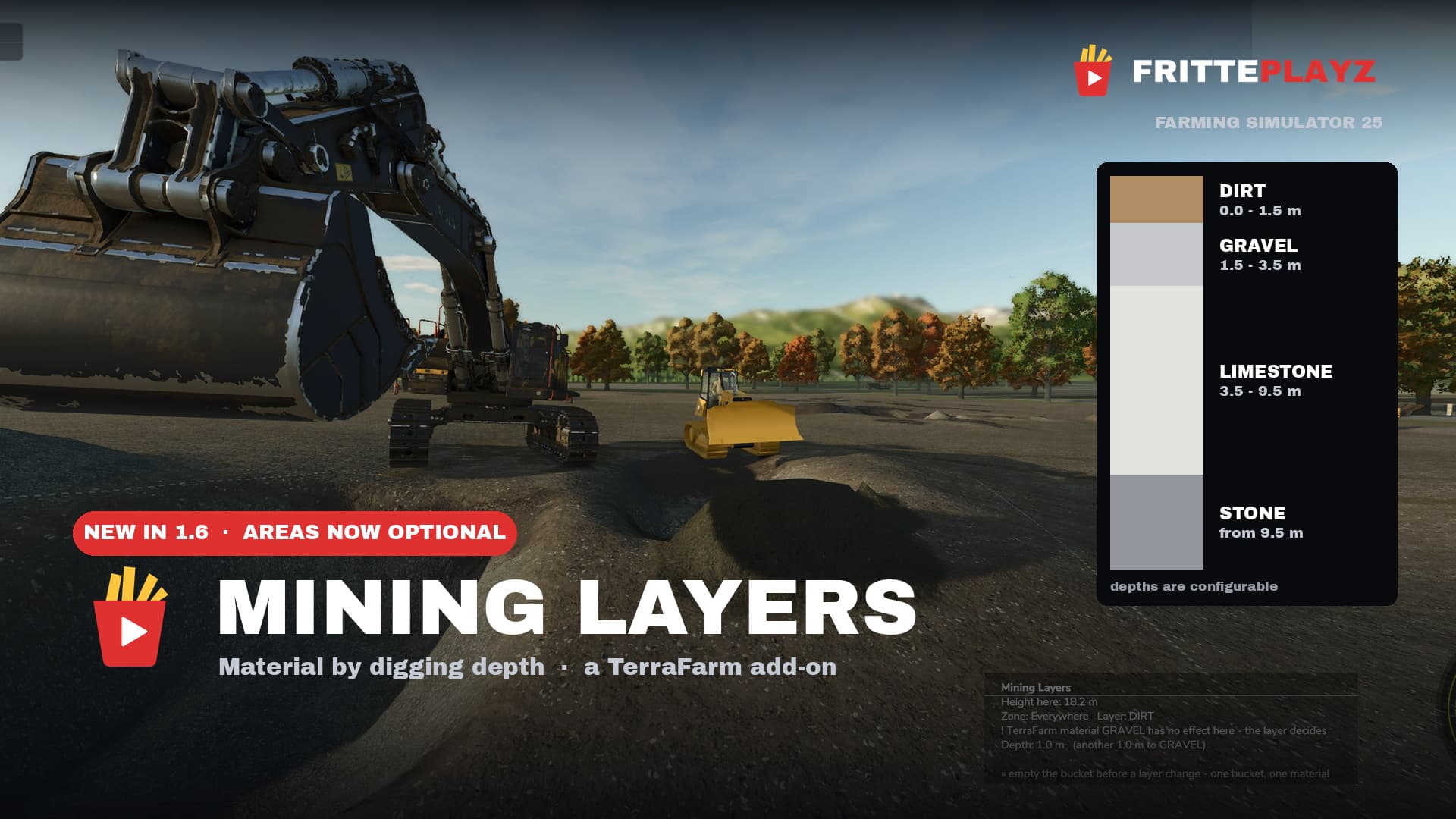
Mining Layers makes the excavated material depend on how deep you dig, instead of picking it from a dropdown. Dig down and it changes: topsoil, then gravel, then paydirt, then rock.
Works on any map — no map editing, no prepared mining map needed. Just draw a TerraFarm area around your future pit and start digging.
FEATURES
– Material by digging depth, layer boundaries in meters below the original surface
– Geology per pit — every area can have its own layer stack
– Spoil piles remember what you dumped on them, so you can’t dump gravel and pick it
back up as paydirt. Dig below a pile’s base and you’re back in geology
– Automatic pit floor, tilted reference plane on slopes, waterline clamping
– In-game menu page with a graphical layer editor and the full manual (English/German)
– Mountain bonus: on steep slopes paydirt sits near the surface — hauling up the
mountain gets rewarded
REQUIREMENTS
Requires TerraFarm by scfmod
Do not rename its folder — it has to stay FS25_0_TerraFarm for load order. You also need at least one machine with a TerraFarm configuration.
GOOD TO KNOW
Areas that have a material assigned behave like plain TerraFarm with no layers —
useful for construction sites and levelling. Path areas are never affected. No
TerraFarm files are modified or shipped. PC/Mac only, since it’s a script mod.
Built and tested on Yukon Valley. Bug reports and feedback are welcome on GitHub —
please include your log.txt and the map you play on.
A FrittePlayz project. Not affiliated with scfmod or GIANTS Software.
Install instructions
1. Download TerraFarm by scfmod first
Keep the folder name FS25_0_TerraFarm, do not rename it (load order depends on it).
2. Download FS25_MiningLayers.zip
3. Put both ZIP files — unpacked, as they are — into your mods folder:
Windows: Documents\My Games\FarmingSimulator2025\mods\
Linux (Steam/Proton): /steamapps/compatdata/2300320/pfx/drive_c/
users/steamuser/Documents/My Games/FarmingSimulator2025/mods/
4. Start the game and enable BOTH mods in the mod selection of your savegame.
5. In game: draw a TerraFarm area (polygon) around the spot where you want your pit,
leave the material fields on “Not set”, and start digging. That’s the whole setup.
Settings and layers: ESC menu → Mining Layers. The full manual is in there too.
Config file: modSettings/FS25_MiningLayers/miningLayers.xml
Credits
FrittePlayz
Files
13.0 MB
Primary6 Downloads
Total downloads including previously deleted files: 23