
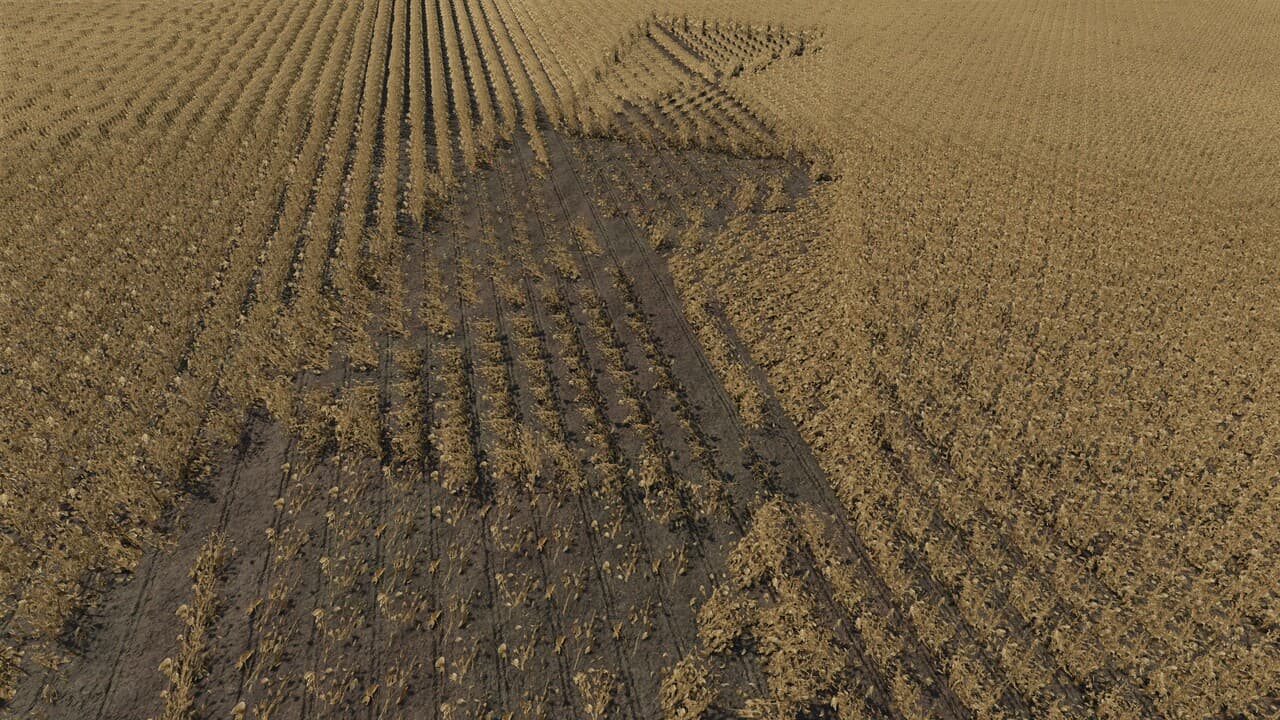
Description
Down Crops ON/OFF Setting
Do not want storm-damaged crops in a particular career? Open the Grain Tickets page and switch Down Crops OFF.
Turning Down Crops OFF:
Prevents new storm-damage events
Disables the down-crop harvesting slowdown
Stops new down-crop quality tracking
Leaves Grain Tickets, moisture, ordinary deductions, source tracking, and Realistic Prices working normally
The setting is saved with each career. In multiplayer, it is controlled by the server/host or a master user. Crop that was already laid over remains until harvested; switching the feature OFF does not magically restore existing plants.
DOWN CROPS & GRAIN ECONOMY — UPDATE V1.7.2.1
This update fixes Grain Tickets disappearing after saving, quitting FS25, and reopening the career.
WHAT WAS FIXED
Grain Ticket history now has an independent backup save for each career.
The mod can repair its save connection if another script mod changes the same FS25 save function.
Added a cooperative save system with Crop Contracts V1.1.0.2 so the two mods no longer fight over the same save functions.
Existing Down Crops, Grain Tickets, market history, and settings remain compatible.
Down Crops & Grain Economy — FS25
Realistic storm-damaged crops, difficult harvesting, elevator-style grain tickets, moisture readings, quality deductions, and optional realistic crop prices for Farming Simulator 25.
Realistic downed crops
Sustained high winds now have a small chance of laying down harvest-ready crops in broad, irregular patches aligned with the wind.
Storm damage is intentionally uncommon. After wind remains above the damaging threshold for 25 seconds, each storm episode receives one 18% damage roll. A successful storm normally produces one group containing two to five damaged spots.
Supported crops:
Corn/maize
Sunflower
Wheat
Barley
Oats
Canola
Sorghum
Soybeans
Rice
Long-grain rice
Cotton, potatoes, sugar beets, sugarcane, vegetables, grass, poplar, and other unsupported crops are not affected.
Difficult harvesting
Combines slow to approximately 2 mph while the lowered header is harvesting through downed crop. Normal working speed returns smoothly after the header clears the damaged area.
The mod tracks how much grain was recovered from downed crop and follows that grain through trailers, auger wagons, and farm grain bins.
Grain Delivery Tickets
Every completed eligible delivery creates an elevator-style Grain Ticket in its own game-menu tab.
Tickets include:
Crop and delivery destination
Source field number or Grain bins
Date, time, and delivered volume
Down-crop percentage
Moisture percentage and Dry/Wet classification
Quality findings
Gross payment
Deductions
Final net payment
Realistic $/bu or $/cwt bid when enabled
Multiple hopper bottoms on the same physical trailer are combined into one ticket. Separate trailers receive separate tickets.
Ticket history automatically resets at the beginning of a new crop year.
Fair quality deductions
Most loads pass inspection.
The normal deduction chance is only 10%. Grain harvested from downed crop can raise the chance, but it can never exceed 20%, even with a fully down-crop load. Any deduction is capped at 4% of the gross payment.
Possible findings include contamination, cracked grain, foreign material, and excess moisture.
Moisture and grain-dryer compatibility
Every ticket includes a moisture reading and the correct Dry/Wet limit for that crop.
Native compatibility is included for Ozz Modding’s Moisture System. The ticket reads the trailer’s actual moisture, recognizes properly dried grain, and will not apply a second wet-grain charge when Moisture System has already handled it.
Common Dry, Wet, Moist, and Dryer fill-type naming variations are also supported.
Optional realistic prices
The Realistic Prices setting changes only supported crop prices. Every other feature remains active when it is switched off.
The offline market model uses U.S. farm-price history from the 2015–2024 crop years. Prices move gradually throughout the year and include modest seasonal movement and local sell-point basis.
Grain is quoted using familiar units:
Corn, wheat, barley, oats, sorghum, and soybeans: dollars per bushel
Sunflower, canola, rice, and long-grain rice: dollars per hundredweight
This is a historical gameplay model, not a live commodity-price feed.
Crop-pack compatibility
The mod does not replace crop textures.
Base-game crops, recolors, and small texture edits should work as long as the crop retains its normal FS25 fruit definition and growth states.
Installation
Place
FS25_DownCropsAndTickets.zipdirectly in your FS25 mods folder.Do not unzip the main mod.
Enable Down Crops & Grain Economy when loading your save.
Do not install the old and new gameplay ZIPs together.
Optional distance helper
FS25 can switch bent crops back to an upright low-detail model at longer distances. The included Down Crop Distance Fix increases the game’s foliage LOD distance so genuine downed plants remain visible farther away.
Close FS25 before running the helper. It creates a backup of game.xml and includes a restore option.
The helper’s high-detail setting is designed for powerful PCs and can reduce performance on demanding maps. The helper is Windows-only; the main gameplay mod supports PC and Mac.
Important
Farming Simulator 25 required
PC/Mac script mod
Not available for consoles
Multiplayer supported
Make a normal savegame backup before installing or updating gameplay script mods
Credits
BigBlue9988
Files
750.8 KB
Primary2 Downloads
Total downloads including previously deleted files: 2
