

Description
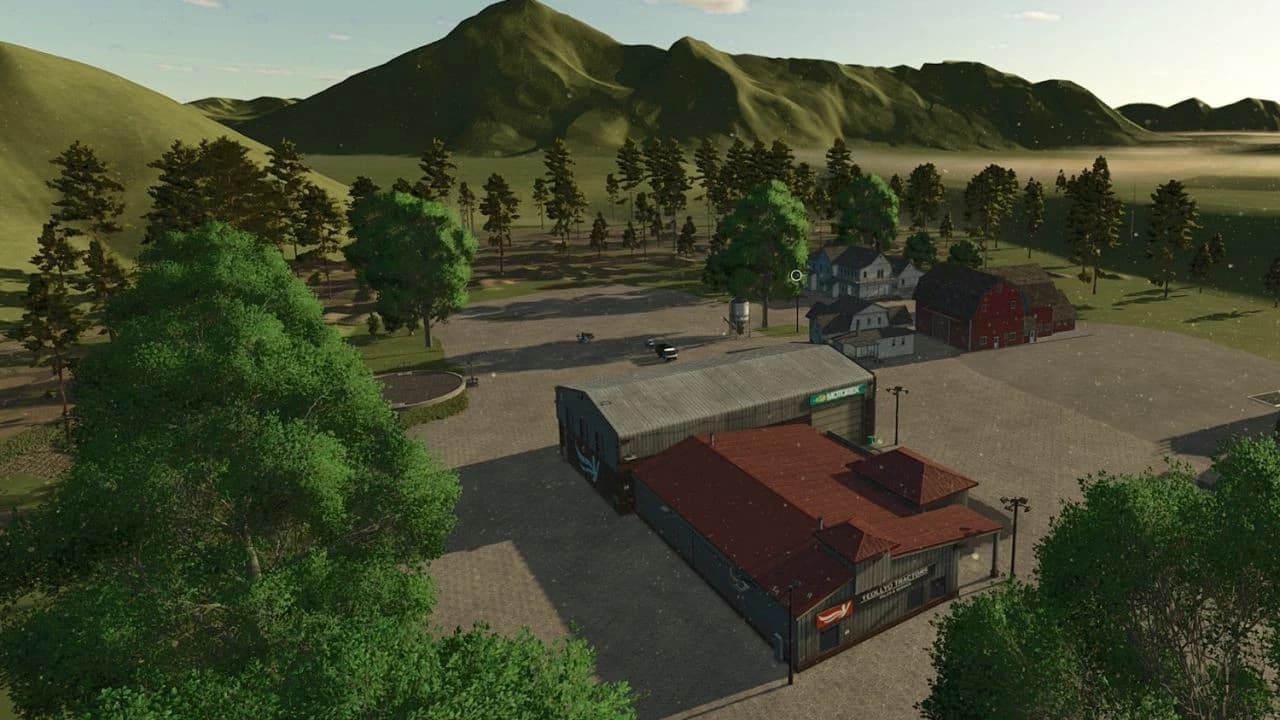
This is a playable prefab template map for Farming Simulator 25. AlfaMods Norway grants all permissions to modify this map to create new mods; no request for permission is necessary. The terrain was carved out manually.
[spoiler title="Due to collision glitch:"]
This glitchy visual error is not picked up inside the developer console in FS25 or GIANTS Editor console. When you are inside the vehicle shopping panel in-game, and you see that the vehicle is offset and ‘dancing’ on the garage floor, clipping through the floor itself, and doing odd movements, it may look something like this:
 Something is not right…
The solution is quite simple….
There’s some kind of alignment glitch along the Y-axis. This has nothing to do with the vehicle itself. The vehicle shown above is a vanilla vehicle that comes with FS25. So, it’s the store itself that probably has somewhat of a hard time with larger Farming Simulator maps.
This line inside the map.xml is usually called to show the store when the player activates the shop trigger. The line of XML code says:
For my map it now says:
For this to work, we will have to copy shop.xml from the data/store/ui from inside the FS25 game directory to our modded map’s directory, where the path in the example above is maps/mapAS/config/shop.xml.
Next, we must edit this line of code inside the shop.xml…or the glitch won’t disappear. The line says:
We will change the yMapPos to 100, like this:
Finally, we’ll need to hit the save button inside our text/code editor (in NotePad ++), etc.
What will happen when we load in our map now is the following:
If this fixed the problem for you, then happy modding! 🙂
[/spoiler]
Main features (vanilla)
- 4 x 4 kilometres terrain surface with 1 (one) units/meter per pixel.
- 5 fields mission playable up to 4.28 ha in size.
- 3 owned vehicles (vanilla)
- player farm (New farmer, start farm: yes).
- vehicle shop with vehicle sell point.
- buying stations for manure/liquid manure and lime.
- farmers market
- animal dealer spot, sleep trigger and wardrobe trigger
- one owned farmland and field (New farmer).
- NPCs house (talking-to vanilla NPCs).
- For multiplayer you’ll need to customize the map how you want it, since this is a prefab/template map after all.
- If you want less dust particles, you can edit this in the map’s environment.xml at line 276, maxDropsMultiplier.
- Less terrain fog if you sleep for one day. Can be changed inside environment.xml.
Technical details for modders
| Version/release date | 1.0.0.0 17/03/2025 |
| descVersion | 96 |
| Base map | mapAS (FS25 Asian map) |
| Map i3D name | mapAlfaBig |
| Pixel size dem.png | 4097 x 4097 |
| Pixel size _weight.png | 8192 x 8192 |
| GDM pixel size | 4096 |
| GRLE pixel size | 4096 |
| Masks | generated (old vanilla mapAS 2048 pix) |
| Pixel size overview.dds (map’s PDA) | 4096 x 4096 |
| Terrain detailed painted PDA? | no |
| Terrain units per pixel | 1 |
| Terrain cast shadow? | no |
| Terrain backdrop mesh? | no |
| Custom paintable terrain textures | no, all vanilla |
| Custom vegetation? | no, all vanilla |
| Custom placeables? | no, all vanilla |
| Water surfaces? | no |
| Fields visual GPS navigation lines | yes |
| AI navigation (create job) lines | no |
| NPC traffic/pedestrian/train system? | no |
| Map included XMLs | mapAlfaHuge.xml sounds.xml colorGrading.xml colorGradingNight.xml environment.xml farmlands.xml fields.xml items.xml placeables.xml shop.xml (vehicle store alignment due to collision glitch) vehicles.xml modDesc.xml |
| Procedural placed assets? | no |
| Painted fields | one painted grass field, farmland #6. |
| All seasons? | yes |
| Crop damage | vanilla, hail and twister. |
[spoiler title="Due to collision glitch:"]
This glitchy visual error is not picked up inside the developer console in FS25 or GIANTS Editor console. When you are inside the vehicle shopping panel in-game, and you see that the vehicle is offset and ‘dancing’ on the garage floor, clipping through the floor itself, and doing odd movements, it may look something like this:
Something is not right… How do you think we could solve this shop trigger problem?
The solution is quite simple….
There’s some kind of alignment glitch along the Y-axis. This has nothing to do with the vehicle itself. The vehicle shown above is a vanilla vehicle that comes with FS25. So, it’s the store itself that probably has somewhat of a hard time with larger Farming Simulator maps.
This line inside the map.xml is usually called to show the store when the player activates the shop trigger. The line of XML code says:
<shop filename="$data/store/ui/shop.xml" />For my map it now says:
<shop filename="maps/mapAS/config/shop.xml" />For this to work, we will have to copy shop.xml from the data/store/ui from inside the FS25 game directory to our modded map’s directory, where the path in the example above is maps/mapAS/config/shop.xml.
Next, we must edit this line of code inside the shop.xml…or the glitch won’t disappear. The line says:
<position xMapPos="0" yMapPos="-100" zMapPos="0" />We will change the yMapPos to 100, like this:
<position xMapPos="0" yMapPos="100" zMapPos="0" />Finally, we’ll need to hit the save button inside our text/code editor (in NotePad ++), etc.
What will happen when we load in our map now is the following:
- the player trigger with the store icon is activated by player interaction
- the store panel is shown in it’s typical Farming Simulator user interface style
- we pick a vehicle we want to buy or lease
- the vehicle gets visually loaded in the store window..at the floor
If this fixed the problem for you, then happy modding! 🙂
[/spoiler]
Credits
AlfaMods
Files
75.6 MB
Primary0 Downloads
Total downloads including previously deleted files: 0
Comments
Login to leave a commentDownload
Version:1.0
File size:75.6 MB
Downloads:0
Rating
Rating
0Rate this mod
Views
0